
Call Outcomes
Overview
A Call Outcome is assigned to a call once the call has ended. Since there are many paths and actions that a caller can take during a call, the Call Outcome is based on the caller's last major action.
To provide a full picture of the caller's journey through any one specific interaction, a Call Outcome Summary is also generated when the call ends. The Call Outcome Summary provides a breadcrumb trail of the major actions the caller has taken through your call flow and may provide additional details when available.
Both Call Outcomes and Call Outcome Summaries are system generated and can't be modified by the end user. Call Classifications is a user managed system for self-classifying calls to help you better manage your call follow-up and reporting. To learn more about Call Classifications visit this support article:
https://support.qivir.io/en/articles/9710721
Where Are Call Outcomes Visible?
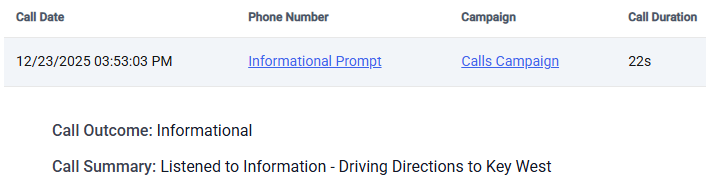
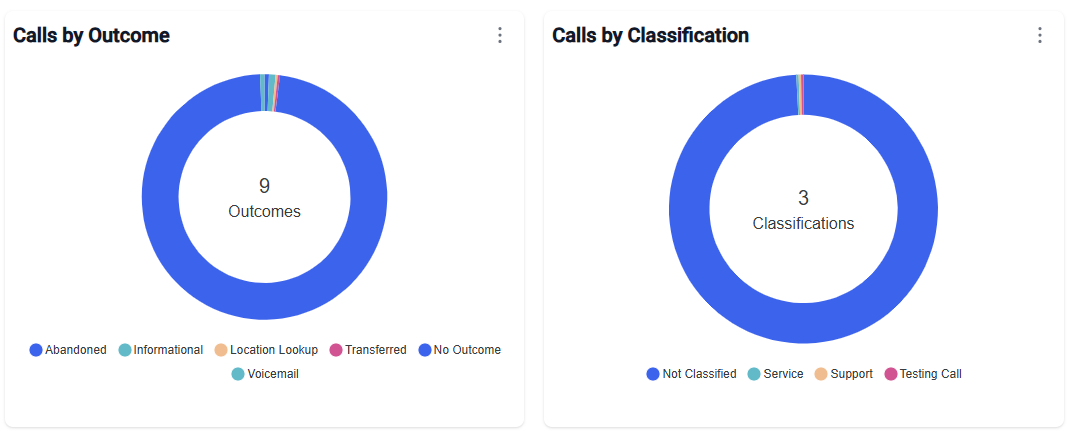
Call Outcomes are visible on the Calls Dashboard as a pie chart in the summary area but more importantly down below in calls activity grid. Call Outcome has its own column, so it is easy to see the outcome of a call at first glance. To see both the call outcome and the call outcome summary, you must expand the row using the expansion icon on the far right of each call detail row - once expanded you will be able to see the call outcome and the longer call outcome summary on the left side of the call details panel.
As a column header on the calls grid:

After expanding the call details panel:
How Can I Report on Call Outcomes?
The Calls Dashboard contains a filter for Call Outcomes which allows you to inspect calls that have a call outcome of interest. You can also export all of the data to Excel to perform your own analysis on or view the pie charts available on the Calls Dashboard.
You can export all of the data to perform your own analysis by clicking on the download icon on the top right corner of the calls activity grid.

You can view the pie charts on the Calls Dashboard:
Possible Call Outcomes
Here is the list of possible Call Outcomes that the system currently supports. Please note that this list may change from time to time.
Abandoned - the caller hung-up before performing any actions
Missed - a transferred or routed call was not answered by the agent
Answered - a transferred or routed call was answered by the agent
Connected - the caller was connected or routed to an agent
Transferred - the caller was transferred or routed to a location
Voicemail - the caller selected or was transferred to voicemail
Informational - the caller listened to an information message
Location Search - the caller performed a location search
Unknown - the caller's specific action was not determined
Other - see the call outcome summary for more details
Many times, the call outcome will be clarified after seeing the full details in the call outcome summary.
Call Outcome Summaries
Call Outcome Summaries provide a more detailed version of the call outcome since the call outcome only shows you the last major action performed by the caller. For simple call flows, where there is only one possible action for the caller to perform, the call outcome summary will be very similar to the call outcome - but should list some additional specifics like which informational message the caller listened to or which agent\location the caller was transferred or routed to.
If your call flow is more complex, giving the caller the ability to perform several actions such as listen to informational message, search for multiple locations, fall back to the main menu and select a different action - then your call outcome summary may list several actions that were performed during the caller's interaction with your call flow.
For example, if the caller listened to your specials, then searched for a store near them, attempted a transfer to that store but the call was not answered and they fell back to the main menu and left a voicemail instead - the call outcome summary will list all of these actions, including any details about each one. In this example, the call outcome itself will be listed as their last action of Voicemail.
Conclusion
Call Outcomes and Call Outcome Summaries are an important tool in helping you understand the caller's journey through the call flow and should be reviewed often. We recommend also using the Call Classification feature and other call attributes available of the Call Details Panel of the Calls Dashboard calls summary grid to help better manage your calls.