
URL Shortening + Tracking
Overview
Did you know that QIVIR's QR Codes are also Shortened URLs? When creating a new QR code and pointing to a web URL, the platform generates a shortened URL that is not only embedded into the QR code but can also be used as a trackable link in social media posts and emails. Just click the Copy Clickable URL button and paste that link in your social media post, SMS or Email messages.
How Do I Shorten a URL?
Creating a shorten URL is as easy creating a QR code in the system. Once you have selected the Destination Type as URL, pasted in your Destination URL (your long URL), selected your Tracking Domain and optionally customized your Tracking Key - just click the Copy Clickable Link button to use your new shortened URL.
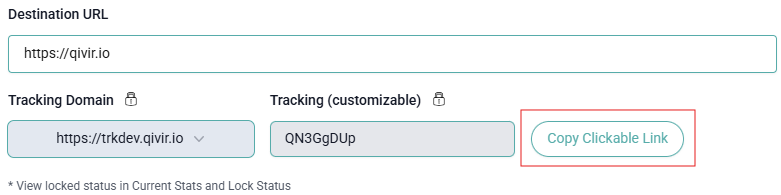
You will need to Save and Re-Open a new QR Code record to make sure it was saved and made trackable before you can use your new shortened URL in any marketing materials.
By default, all QR codes and URLs produced by the platform are trackable as this is the only way to get true attribution - and we can tell if the QR code itself was scanned, or if the companion link was clicked as you will see in the dashboards and reports.