
Change 'Company' and 'Location' Labels
Overview
The QIVIR platform allows you to adapt the default terminology it uses to your own environment. For example, the platform defaults to Company and Locations but you call these entities Brands and Franchises.
These labels can easily be changed under the company settings to better represent your current working environment.
Change Default Labels
You can change your default terminology labels by following these steps:
Navigate to Companies under Settings in the main navigation bar.
Select the Company you would like to update these labels for and click on the company name or select Edit on the ellipse at the end of the row.
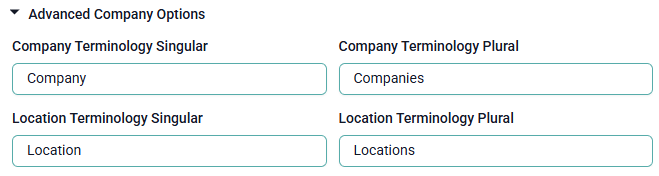
Expand the Advanced Company Options toward the bottom of the Companies fields.
Update both the Singular and Plural versions of the labels with your new terminology.
Click the Update Company button in the lower right corner of the screen.
Select Sign Out from the user profile menu and log back in to see your changes.
Conclusion
In addition to providing useful core marketing technologies, QIVIR strives to provide comfort features to improve the overall feel and acceptance of the platform.